trim
ipyrad2 trim prepares sample-level FASTQ files for the rest of the assembly workflow by trimming and filtering reads, including behavior that is specific to RAD-style data and to ipyrad2's workflow: sample naming from filenames, paired-read grouping, restriction-junction trimming, optional manual cutsite control, UMI handling in i5/index2, and a run-level trim summary.
In a typical workflow, trim comes after demux and before denovo or map.
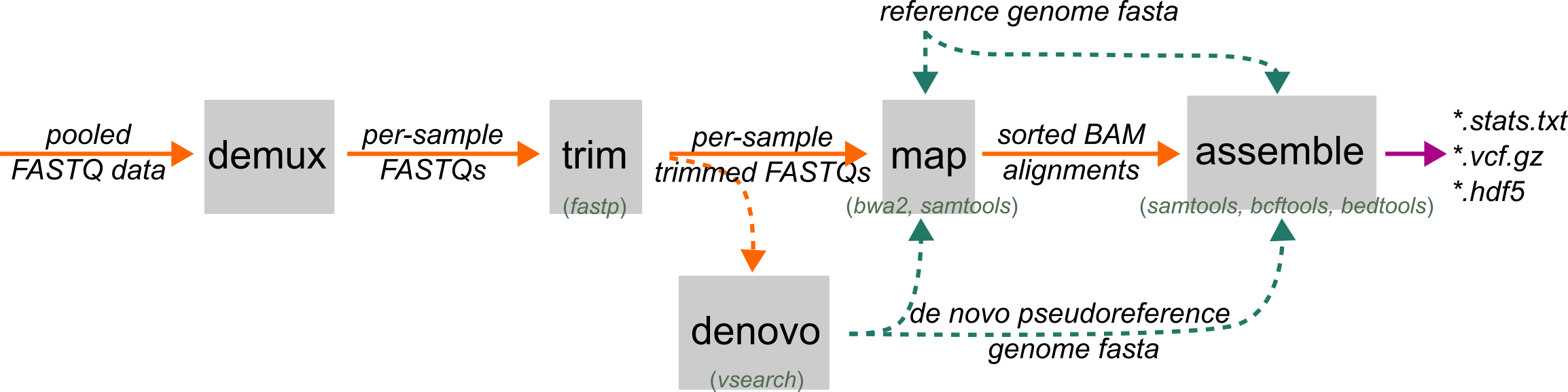
Overview
Read trimming and filtering is an optional preprocessing step in ipyrad2 that removes technical sequence and low-quality data prior to assembly. Trimming and quality filtering are implemented via a wrapper around fastp (Chen et al. 2018). The step can (i) trim adapter sequence using fastp’s automatic adapter detection, and for paired-end data additionally uses overlap-aware adapter trimming and base correction in the overlapping region; (ii) trim low-quality bases and filter reads failing user-defined quality/length thresholds; and (iii) trim restriction enzyme cutsite/overhang sequence from read termini.
Restriction overhang motifs may be provided by the user or inferred from the data using motif counting, and the inferred motif is used to trim the appropriate number of bases from read starts. During library preparation unique molecular identifiers (UMIs) can be incorporated in the Illumina i5 index of paired-end reads to allow for duplicate marking for improved variant calling. If present, the i5 tags can be moved to the read name/header in this step for downstream use. Trimmed reads are written as gzipped per-sample FASTQ files (R1 or R1/R2), and a summary statistics report records counts and reasons for trimmed bases and filtered reads.
When to Use
Use trim when your reads still need quality filtering, adapter trimming, or restriction-junction trimming before mapping or pseudoreference construction.
This is the default path for most ipyrad2 workflows because it is aware of the read structure common in RAD, ddRAD, GBS, 3RAD, and related reduced-representation libraries. If your sequencing provider or another workflow has already produced trusted trimmed sample FASTQs, you can start later in the pipeline. But external trimming should be used carefully, because over-trimming at the 5' end or inconsistent restriction-junction handling can make later steps harder to interpret.
Prerequisites
Sample-level FASTQ files. These can come from demux or an external demultiplexer.
Command Patterns
The smallest useful run is:
ipyrad2 trim -d FASTQs/*.fastq.gz -o TRIMMED/
That tells ipyrad2 to parse sample names from the FASTQ filenames, infer cutsite motifs when possible, run fastp, and write trimmed reads and reports into TRIMMED/.
Core I/O
-d, --fastqs: one or more FASTQ paths or shell-expanded globs-o, --out: output directory, default./TRIMMED-f, --force: allow overwriting an existing trim output directory when matching trim artifacts are already present
If trim outputs already exist and --force is not set, ipyrad2 stops before doing any work.
Quality and Length Filtering
These options control the main fastp quality path:
-q, --min-quality: minimum qualified base quality, default20-u, --max-unqualified-percent: maximum percent low-quality bases allowed in a read, default15-M, --min-mean-window-quality: mean quality required in the sliding window used for front and tail cutting, default30-W, --cut-window-size: sliding-window size for quality cutting, default5-n, --max-ns: maximum number ofNbases allowed in a read, default5-e, --min-trimmed-length: minimum retained read length after trimming, default35-Q, --disable-quality-filtering: skipfastpquality filtering
Restriction-junction trimming and length filtering can still matter even when quality filtering is disabled.
Cutsite Motifs and Adapters
By default, ipyrad2 samples reads and tries to infer the restriction junction on each read end. That inferred junction is then trimmed from the front of the read.
-e1, --cutsite-1: manually set the R1 cutsite motif or motifs-e2, --cutsite-2: manually set the R2 cutsite motif or motifs-k, --max-reads-kmer: maximum reads sampled for motif inference, default500000-E, --disable-infer-cutsite-motifs: skip motif inference-A, --disable-adapter-trimming: skip adapter trimming
Use explicit cutsite motifs when:
- the automatic inference chooses the wrong motif
- your library uses a known multi-enzyme design
- you want a fully explicit trimming run with no motif inference step
If multiple motifs are inferred on one read end, ipyrad2 warns but still proceeds by using the longest inferred junction length. That can be expected in valid multi-enzyme libraries such as 3RAD, but it can also indicate low-quality reads or too little data sampled during motif inference.
Performance and Compatibility
-x, --max-reads: limit the number of reads processed per file for quick inspection or debugging-c, --cores: total cores available to the run, default6-t, --threads: threads used by eachfastpjob, default3--phred64: treat input quality scores as legacy phred64 and convert them to phred33
ipyrad2 runs up to cores // threads trim jobs in parallel. --threads cannot exceed --cores.
Sample Naming and UMI Handling
-dx, --delim-str: delimiter used to parse sample names-di, --delim-idx: index of the retained token when splitting names-s, --suffix: suffix appended to parsed sample names before writing outputs-U, --umi-tag-in-i5: move the i5/index2 value into the read name as a UMI tag
Use these options when filenames do not follow the default naming assumptions or when your data carry UMIs outside the read body.
Logging
-l, --log-level: logging verbosity, defaultINFO
At normal verbosity, ipyrad2 reports how many usable samples were found, which samples were skipped as empty, which cutsite motifs were selected, and where trim outputs were written.
Inputs and Naming
Use -d/--fastqs with one or more FASTQ paths or shell-expanded globs. Inputs can be single-end or paired-end, and ipyrad2 will try to group them into samples automatically.
Sample names are parsed from filenames. In many datasets the default parsing is enough, but if filenames contain repeated delimiters or custom suffixes you can control parsing using explicit delimiter-based pairing and sample naming, see Using -dx and -di to pair and name samples.
-dx, --delim-str: delimiter substring used to split the filename-di, --delim-idx: which side of the delimiter to keep, default1-s, --suffix: suffix to append to the parsed sample name before writing outputs
trim also accepts optional controls for quality thresholds, minimum read length, cutsite motifs, phred64 input, UMI placement, and parallelism. Those are described below in grouped command patterns.
Outputs
For each sample, trim writes:
SAMPLE.R1.trimmed.fastq.gzSAMPLE.R2.trimmed.fastq.gzfor paired-end dataSAMPLE.stats.jsonSAMPLE.stats.html
For the run as a whole, it also writes:
ipyrad_trim_stats_N.txt
The summary text file is numbered so repeated trim runs in the same output directory do not overwrite older summaries. It includes per-sample before-and-after read totals, mean read lengths, Q20/Q30 rates, reads filtered for low quality, too many N bases, low complexity, reads filtered for being too short, and adapter-trimming counts where available.
Why This Is Not Just a Plain fastp Run
ipyrad2 uses fastp underneath, but trim is not a bare pass-through.
- ipyrad2 first discovers and groups FASTQ files into sample units.
- It skips empty FASTQ files before launching jobs and reports skipped samples clearly.
- It can infer restriction-junction motifs from a kmer sample of the reads, then trim those motifs from the 5' end.
- It lets you override inference with explicit
--cutsite-1and--cutsite-2motifs. - It supports
--umi-tag-in-i5for workflows where the UMI is stored in index2/i5. - It writes per-sample HTML and JSON reports plus a run-level
ipyrad_trim_stats_N.txtsummary.
That extra layer is the main reason ipyrad2 recommends its own trimming step instead of treating preprocessing as a generic external task.
Common Failures and Interpretation Notes
No files match the input glob
If the shell does not expand your -d pattern the way you expect, ipyrad2 may see no usable inputs. Check the glob itself first and make sure the files are visible from your current working directory.
Sample names are parsed incorrectly
If paired reads are not grouped the way you expect, or multiple files collapse into one sample unexpectedly, adjust --delim-str, --delim-idx, or --suffix so the parser sees the correct sample token.
Empty FASTQ files are skipped
ipyrad2 checks the first FASTQ record of every input sample before running fastp. Empty files are skipped with a warning. If all files are empty after validation, the run stops.
FASTQ is truncated or malformed
The first record must contain a valid header, sequence, + separator, and quality line. If that first record is incomplete, trim stops with a clear FASTQ-format error.
Unsupported compression
Only plain FASTQ and .gz FASTQ are supported. .bz2 input raises an error before trimming begins.
Existing output artifacts block the run
If the target output directory already contains trimmed FASTQs or trim reports for the same samples, ipyrad2 refuses to overwrite them unless --force is set.
threads exceeds cores
trim validates this before running. Increase --cores, reduce --threads, or both.
Motif inference looks wrong
If inferred cutsite motifs do not match the library design, front trimming can be too aggressive or too weak. In that case:
- set
--cutsite-1and--cutsite-2explicitly, or - disable inference with
--disable-infer-cutsite-motifs
This is especially important for unusual multi-enzyme libraries or low-quality pilot data.
Examples
Basic trim run
ipyrad2 trim -d DATA/*.fastq.gz -o TRIMMED/
Tune quality thresholds and parallelism
ipyrad2 trim -d DATA/*.gz -o TRIMMED/ -q 20 -u 15 -M 30 -W 5 -n 5 -e 35 -c 12 -t 3
Override sample-name parsing
ipyrad2 trim -d DATA/*.gz -o TRIMMED/ -dx _R -di 1
Set cutsite motifs manually
ipyrad2 trim -d DATA/*.fastq.gz -o TRIMMED/ -e1 TGCAG -e2 CGG
Limit reads for a quick test run
ipyrad2 trim -d DATA/*.fastq.gz -o TRIMMED_TEST/ -x 100000 -c 6 -t 3
Process phred64 data with UMI in i5/index2
ipyrad2 trim -d DATA/*.gz -o TRIMMED/ --phred64 -U