map
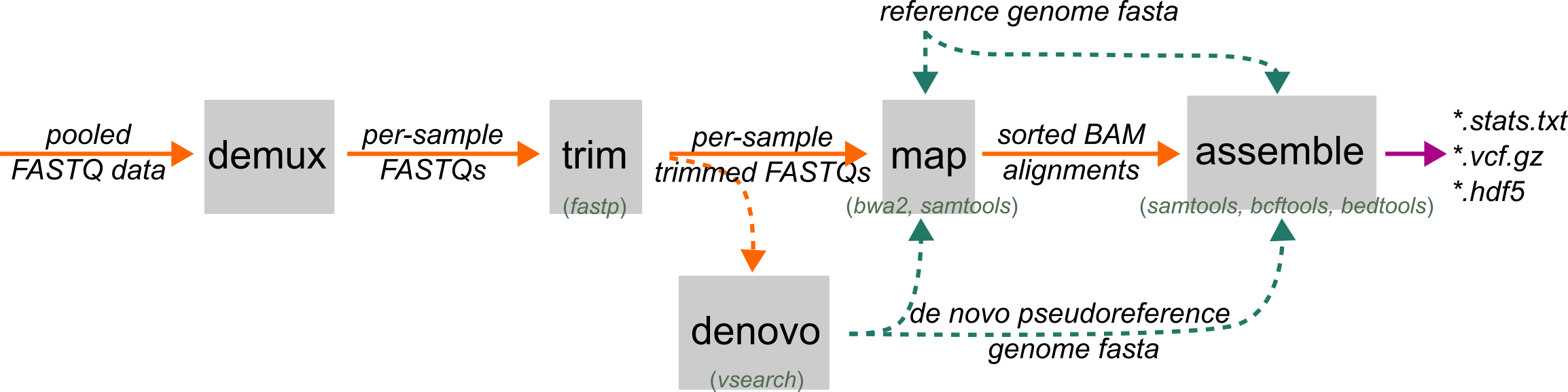
ipyrad2 map aligns sample FASTQ files to a reference or denovo pseudoreference and writes coordinate-sorted, indexed BAM files. It uses bwa-mem2 for alignment and samtools for
filtering, sorting, indexing, duplicate removal, and stats reporting.
In the normal assembly workflow, map comes after trim and before assemble. Its main job is to convert trimmed reads into final BAMs that are ready for locus assembly.
When to Use
Use map when you have sample-level FASTQ files and a reference or denovo pseudoreference sequence (e.g., from denovo) to align against. If you already have mapped BAM files, you do not need this step. Start directly at assemble.
Prerequisites
- Sample-level FASTQ or FASTQ.gz files, usually from
trim - A reference or pseudoreference FASTA supplied with
-r/--reference
Command Patterns
The smallest useful run is:
ipyrad2 map -d TRIMMED/*.fastq.gz -r REF.fa -o MAPPED/
That tells ipyrad2 to examine the files for pairs, parse sample names from the filenames, index the reference if needed, map reads with bwa-mem2, filter and sort alignments with samtools, and write final BAMs into MAPPED/.
Core Inputs
-d, --fastqs: one or more FASTQ paths or shell-expanded globs-r, --reference: reference FASTA or denovo pseudoreference FASTA-o, --out: output directory for BAMs and map stats, default./MAPPED
If the reference is not already indexed for bwa-mem2, map indexes it automatically before launching mapping jobs.
Duplicate Removal
-m, --mark-dups-by-coords: remove PCR duplicates by coordinates (for WGS-style data only)-u, --mark-dups-by-umis: remove PCR duplicates using UMI tags (for some RAD data only)
Removal of PCR duplicates can improve variant calling accuracy. For WGS samples these can be detected and removed based on the mapping position of read pairs, which we support using the -m option. RAD-seq data cannot use position information because they start at fixed positions due to their dependence on restriction cut sites. Some RAD-seq libraries address this by incorporating random i5 UMIs. See the i5 UMI recipe for how to use this option if it is appropriate for your data.
Sample Naming and Grouping
-i, --imap: subset, rename, or merge parsed samples using a sample-to-group table-dx, --delim-str: delimiter used to parse sample names from FASTQ filenames-di, --delim-idx: index of the retained token when splitting names
Use these when FASTQ filenames do not follow the default parser assumptions or when technical replicates should be merged before mapping. To merge sample's assign them to the same destination name in the IMAP. To split names from filenames use -di and -dx as described in the name parsing recipe.
Performance and Overwrite
-c, --cores: maximum total cores to use, default6-t, --threads: threads per mapping job, default3-f, --force: overwrite existing.bamand.bam.csioutputs for matching sample names
ipyrad2 runs up to cores // threads mapping jobs in parallel. --threads cannot exceed --cores.
Without --force, samples that already have BAM outputs are skipped instead of being remapped.
Inputs and Sample Grouping
Use -d/--fastqs with one or more FASTQ paths or shell-expanded globs. Inputs can be single-end or paired-end, but all samples in one run must be consistent.
Sample names are parsed from FASTQ filenames. If the default parsing is not right for your filenames, use the -dx, --delim-str and -di, --delim-idx options. (See Using -dx and -di to pair and name samples.
You can provide -i/--imap to subset, rename, or merge samples before mapping. The imap file is a whitespace-delimited two-column table:
sample group
This table can do three things:
- keep only the subset of listed samples from among the input data
- rename samples before BAM writing
- merge multiple parsed samples into one mapping target by concatenating their FASTQs
Output files
For each sample, map writes:
SAMPLE.trimmed.sorted.bamSAMPLE.trimmed.sorted.bam.csi
For the run as a whole, it writes:
ipyrad_map_stats_N.txt
The stats report is numbered so repeated runs in the same output directory do not overwrite older summaries. It reports final BAM retention and alignment-quality summaries rather than full aligner logs.
Stats report
For single-end data, the report includes fields such as:
- reads processed
- reads filtered before BAM writing
- reads retained in the final BAM
- proportions retained
- counts of reads below reporting thresholds for MAPQ, soft clipping, and NM
For paired-end data, it also reports:
- pairs evaluated in the final BAM
- pairs with both mates retained
- singleton counts
- duplicate-removal totals when duplicate marking was enabled
- pair-level reporting summaries for MAPQ, soft clipping, NM, and insert size
The MAPQ, soft-clipping, NM, and TLEN thresholds in this report are reporting thresholds only. They are not additional mapper filters applied during BAM generation.
Common Failures and Interpretation Notes
Mixed SE and PE inputs
If some parsed samples are paired-end and others are single-end, the run stops. That includes cases where an imap merge would mix single-end and paired-end inputs into one output sample. You can instead run these as two separate calls to map selecting different input data.
Reference indexing fails
map auto-indexes the reference with bwa-mem2 when needed. If the reference path does not exist or its directory is not writable, indexing fails before mapping starts. You can force re-indexing by using --reindex-reference.
Duplicate-removal mode is invalid
The two duplicate-removal modes cannot be selected together. Duplicate removal also cannot be used for single-end data.
imap names do not match parsed samples
If some names in the imap file do not match canonical parsed sample names, ipyrad2 warns and skips them. If no names match at all, the run stops and the imap file or parsing arguments need to be fixed.
Disk-space failures during sorting
The mapping pipeline creates temporary BAMs during sorting and duplicate removal. If the output filesystem fills up, samtools sort can fail with a disk-space error. ipyrad2 can usually report these failures. The fix is to free space or choose a different output location.
Examples
Basic reference-based mapping
ipyrad2 map -d TRIMMED/*.fastq.gz -r REF.fa -o MAPPED/
Map against a denovo pseudoreference
ipyrad2 map -d TRIMMED/*.fastq.gz -r DENOVO/pseudoref.fa -o MAPPED/
Subset, rename, or merge samples with imap
ipyrad2 map -d TRIMMED/*.fastq.gz -r REF.fa -o MAPPED/ -i IMAP.tsv
Coordinate-based duplicate removal for WGS-style data
ipyrad2 map -d TRIMMED/*.fastq.gz -r REF.fa -o MAPPED/ -m
UMI-based duplicate removal after trim -U
ipyrad2 map -d TRIMMED/*.fastq.gz -r REF.fa -o MAPPED/ -u