assemble
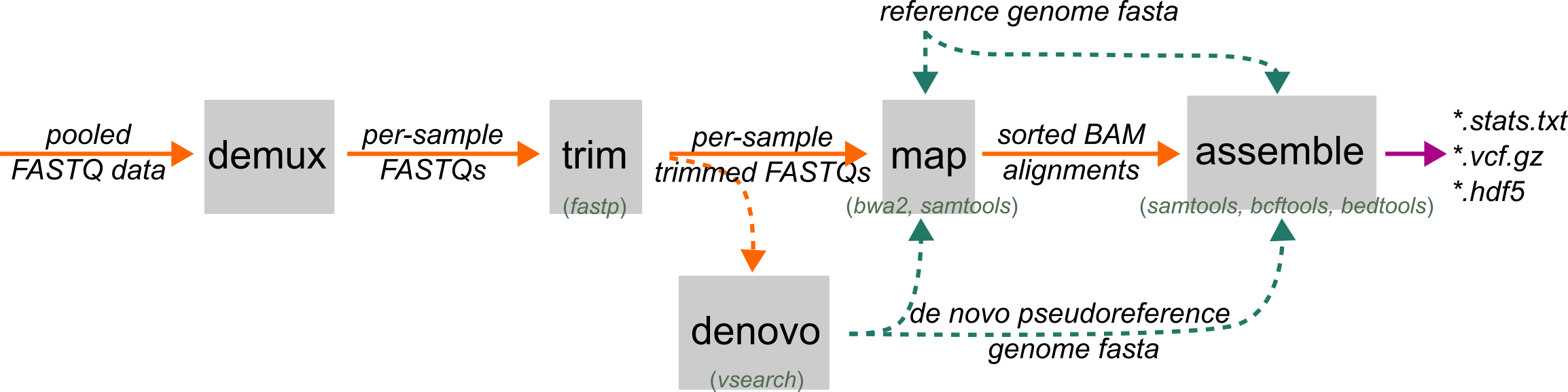
ipyrad2 assemble takes mapped BAM files and a reference (or pseudoreference) genome fasta and generates
a the main project outputs:
final assembled loci, a filtered VCF, a loci BED, a human-readable stats report, and
an HDF5 database that can be used by downstream export and analysis commands.
This is the normal next step after map, but it is also a valid entry point if you
already have trusted mapped BAMs from another workflow.
When to Use
Use assemble when you already have mapped BAM files against a reference or denovo pseudoreference
and you are ready to define loci, call variants, and write final project outputs.
Use cases fall into three modes:
- standard RAD assembly: RAD BAMs define loci and are assembled
- mixed RAD/WGS assembly: RAD BAMs define loci, and WGS BAMs contribute genotype and coverage information inside those same loci
- explicit BED assembly:
--loci-bedsupplies loci directly, soassembleskips RAD-based locus delimiting
If no RAD BAMs are available, assemble still works, but only when --loci-bed is provided and at least one BAM file is supplied.
Prerequisites
- mapped BAM files, usually from
map - the same reference FASTA or denovo pseudoreference used during mapping
The BAMs do not need to come only from ipyrad2, but they do need to be coordinate-consistent with the reference you provide here.
What assemble does
- It filters BAM inputs based on parameter thresholds to remove low quality mappings.
- It delimits loci from shared coverage BEDs among RAD sample BAMs, or loads them directly from
--loci-bed. - It runs within-sample and across-sample paralog filtering to define the final set of loci BEDs.
- It jointly calls variants inside those loci and applies project-wide genotype and site filters.
- It builds consensus sequences, writes final loci and BED outputs, a filtered VCF, and a HDF5 database file.
Command Patterns
The smallest standard RAD assembly is:
ipyrad2 assemble -d BAMS/RAD/*.bam -r REF.fa -o OUT
Core Inputs
-d, --rad-bams: RAD BAM inputs that delimit loci unless--loci-bedis provided-w, --wgs-bams: optional WGS BAMs assembled only inside RAD-defined loci or inside loci from--loci-bed-r, --reference: reference FASTA used for mapping and reused here-b, --loci-bed: explicit loci BED instead of RAD-based locus delimiting-n, --name: output prefix, defaultassembly-o, --out: output directory, default./OUT
Mapped-Read Filters
These filters are applied when assemble prepares its analysis BAMs:
-qm, --min-map-q: minimum MAPQ retained in analysis BAMs-ms, --max-softclip: maximum allowed soft-clipped bases-me, --max-nm: maximum allowed NM edit distance-mt, --max-tlen: maximum absolute TLEN for paired-end reads
These settings can strongly affect downstream locus retention. Overly strict values can make good data disappear before locus delimiting even begins.
Locus BED Delimiting
These settings matter only when loci are being delimited from RAD BAMs:
-m, --min-locus-sample-coverage: minimum number of RAD samples required to retain a locus-z, --min-locus-length: minimum locus length after delimiting-g, --min-locus-merge-distance: merge nearby coverage intervals within this distance
WGS samples do not help a locus pass -m. In mixed RAD/WGS runs, RAD BAMs define the loci first, and WGS samples are assembled only inside loci that already passed the RAD-based delimiting step.
If --loci-bed is provided, assemble ignores these RAD-delimiting controls.
Locus and Variant Filters
-qb, --min-base-q: minimum base quality used during mpileup and related calling steps-qs, --min-site-q: minimum site QUAL for retained variant sites-qg, --min-geno-q: minimum per-sample genotype quality-s, --min-sample-depth: minimum within-sample depth to keep a genotype instead of masking it--min-sample-observed-fraction: minimum fraction of non-N, non-gap bases required to keep one sample in one final locus-u, --max-locus-hetero-frequency: maximum fraction of samples heterozygous at one site before the locus is considered paralog-like-y, --max-locus-variant-frequency: maximum fraction of sites in a locus that can be variant before filtering-a, --min-locus-trim-sample-coverage: minimum number of samples with non-Ncalls required to keep positions at locus edges
These settings control what survives into the final .loci, .vcf.gz, and .hdf5 outputs. In particular, --min-sample-observed-fraction removes sample rows that are mostly missing after trimming and depth/genotype masking, while --max-sample-hetero-frequency separately targets rows with too many heterozygous observed bases.
Paralog Filters
assemble has an explicit paralog-scoring stage. The current controls are:
--depth-z-max--softclip-len-threshold--softclip-frac-max--third-frac-cut--min-3allele-sites--maf-threshold--max-sites-above-maf--paralog-fail-frac-max--max-sample-hetero-frequency
loci can be flagged as paralog-like by unusually deep coverage, unusually clipped reads, strong third-allele evidence, or excess allelic variation. Those signals are evaluated within samples and then reduced across samples before the final shared BED is accepted.
Sample Naming, Grouping, and Masks
--subsample: select a subset of BAMs by filename or sample name--rename: rename final sample names from BAM basenames-p, --populations: grouped-calling populations file-x, --masks: site-pattern masks applied in the final assembled sequences
Use these when you need grouped calling, stable sample names that differ from BAM headers, or post-consensus masking of known sequence patterns.
Performance and Overwrite
-c, --cores: maximum total cores, default6-t, --threads: threads per multithreaded job, default3-f, --force: overwrite assemble outputs for this run
assemble uses both multithreaded tools and pooled job stages, so cores and threads together determine how much parallel work can happen at once.
Outputs
The main final outputs are:
NAME.lociNAME.hdf5NAME.vcf.gzNAME.bedNAME.stats.txt
The final HDF5 is the main downstream project database. See the Writing Outputs and [Analysis][analysis] sections for example usage.
Stats
NAME.stats.txt is the human-readable final summary. It includes counts such as:
- number of samples
- loci after delimiting
- loci after paralog filtering
- final loci written
- final loci retained as a fraction of delimited loci
- assembled sites
- final SNP sites written
- variable and phylogenetically informative sites
- alignment occupancy fraction
- overlapping-indel masking totals
assemble also keeps a named working directory:
OUT/NAME_tmpdir/
That temp directory is useful for debugging and inspection. Important intermediate files include:
beds/loci.raw.bedwhen RAD-based delimiting is usedbeds/loci.paralog_filtered.bed- normalized grouped-calling tables
- per-sample BED masks and paralog stage outputs
Examples
Basic RAD assembly
ipyrad2 assemble -d BAMS/RAD/*.bam -r REF.fa -o OUT -m 4 -qm 20
Mixed RAD/WGS assembly
ipyrad2 assemble -d BAMS/RAD/*.bam -w BAMS/WGS/*.bam -r REF.fa -o OUT -m 4 -qm 20
Assemble from an explicit loci BED
ipyrad2 assemble -d BAMS/RAD/*.bam -r REF.fa -b loci.bed -o OUT --max-tlen 2000
Grouped calling with a populations file
ipyrad2 assemble -d BAMS/RAD/*.bam -r REF.fa -p pops.tsv -o OUT
Rename BAM-derived sample names before writing outputs
ipyrad2 assemble -d BAMS/RAD/*.bam -r REF.fa --rename rename.tsv -o OUT
WGS-only assembly inside a supplied loci BED
ipyrad2 assemble -w BAMS/WGS/*.bam -b loci.bed -r REF.fa -o OUT