Assembly Guide
The ipyrad2 assembly workflow involves running a sequence of subcommands, as shown below.
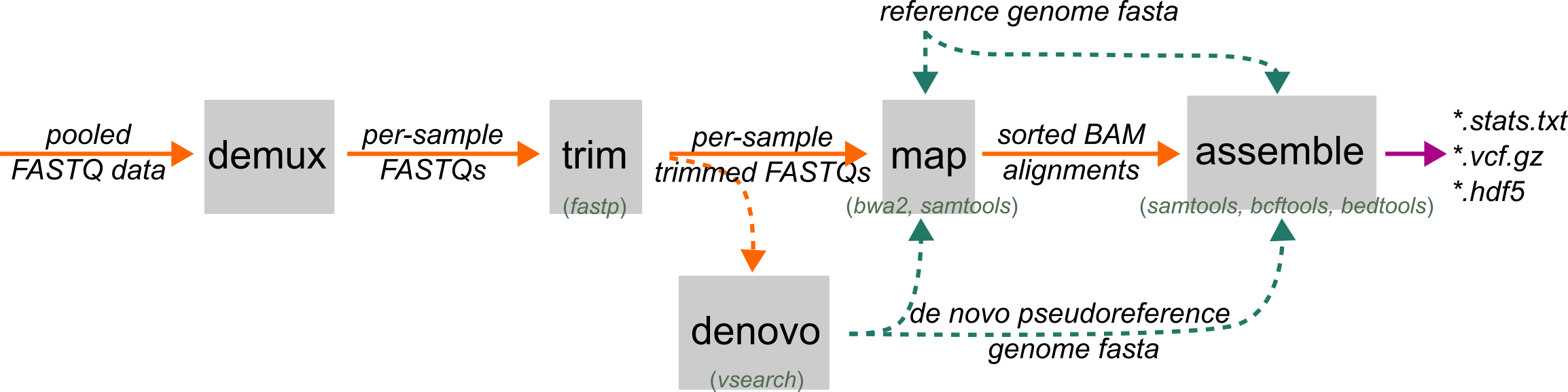
Standard Example
The most common workflow starts with pooled RAD reads and ends with assembled loci, variants, and an HDF5-backed dataset:
# 1. demultiplex pooled reads into sample files
ipyrad2 demux -d RAW/*.fastq.gz -b barcodes.tsv -o FASTQs/ -c 10 -t 2

# 2. trim sample reads for quality, adapters, and cutsite motifs
ipyrad2 trim -d FASTQs/*.fastq.gz -o TRIMMED/ -c 10 -t 2

# 3. map reads to a reference genome
ipyrad2 map -d TRIMMED/*.fastq.gz -r REF.fa -o BAMS/RAD -c 10 -t 2

# 4. assemble loci and call variants
ipyrad2 assemble -d BAMS/RAD/*.bam -r REF.fa -o OUT -m 4 -qm 20 -c 10 -t 2
If you also have whole-genome BAMs mapped to the same reference, they can join at the final stage:
ipyrad2 assemble -d BAMS/RAD/*.bam -w BAMS/WGS/*.bam -r REF.fa -o OUT -m 4 -qm 20
That mixed run is useful because the RAD samples still define the loci while WGS samples contribute information inside those same RAD-defined windows.
Step by Step
- Start with demux if your reads are still pooled by lane or library.
- Continue to trim to prepare sample FASTQs.
- Use denovo only if you do not have a suitable external reference and need a pseudoreference first.
- Use map to map trimmed reads to either an external reference or a denovo-derived pseudoreference.
- Finish with assemble, which defines loci from RAD BAMs, calls variants, and writes the assembled outputs.
Alternate Entry Points
- If your reads already arrive split by sample, skip
demuxand begin at trim. - If your reads are already trimmed and you have a reference, start at map.
- If you already have mapped BAMs, start directly at Assemble.
- If no suitable reference exists, use denovo before mapping.
- WGS does not replace the RAD path in the current workflow. WGS BAMs can be added only at assemble, and only inside loci defined by the RAD samples.
What You Get
The main outputs of the assembly workflow are:
- an assembled HDF5 database
- a filtered VCF
- BED intervals for loci
- locus-oriented sequence outputs such as
.loci
From there you can either move to Writing Outputs for exported windows, loci, or SNP datasets, or continue to the Analysis Guide for downstream methods that run on assembled or SNP-capable HDF5 data.